 Claude to PDF
Claude for Word: What the Add-in Does, and When You Need an Export Instead
Claude for Word is Anthropic's add-in that puts Claude inside Microsoft Word to read, edit and draft the document you have open. It doesn't turn your claude.ai conversations into Word files — for that, you export the chat.
By the Claude to PDF team · Updated · How we research
What is Claude for Word?
Claude for Word is an add-in made by Anthropic that brings Claude into Microsoft Word. Instead of switching between claude.ai and your document, you ask Claude questions and request edits in a panel inside Word, and it works directly on the document you have open. It's aimed at people who draft, review and negotiate documents — contracts, memos, reports — and it's available on Claude's Pro, Max, Team and Enterprise plans.
Searches for "Claude to Word" usually mean one of two things: Claude working inside Word (this add-in), or a claude.ai conversation turned into a .docx file (an export). The comparison further down helps you pick.
What the Claude for Word add-in can do
Based on Claude's official documentation for Claude for Word, the add-in can:
- Answer questions about your document with clickable citations that jump to the section it's referring to.
- Edit selected text while keeping the surrounding styles, numbering and formatting.
- Work in tracked changes, so every edit lands as a revision you can accept or reject in Word's review pane.
- Work through comment threads, editing the text each comment is anchored to and replying with what it changed.
- Summarize a counterparty's redlines and flag the changes worth pushing back on.
- Fill templates with drafted content that inherits your document's heading and paragraph styles.
- Find every provision on a theme using meaning rather than exact keywords.
Requirements
| Requirement | Details |
|---|---|
| Claude plan | Pro, Max, Team or Enterprise |
| Word on Windows | Microsoft 365 subscription, Version 2205 (build 15202.10000) or later |
| Word on Mac | Version 16.61 (build 22040100) or later |
| Word on the web | Supported |
| Not supported | Word 2016 and 2019 perpetual or volume licenses, Word on iPad and Android, and legacy .doc files (save as .docx first) |
| Account | Sign in with your Claude account inside the add-in |
Anthropic's companion add-in for spreadsheets is covered in Claude to Excel.
How to add Claude to Microsoft Word
For yourself:
- Open the Claude for Microsoft 365 listing on Microsoft AppSource.
- Select Get it now to install it.
- Open Word, activate the add-in, and sign in with your Claude account.
You can also start from inside Word: click Add-ins on the Home tab and search for "Claude".
The search results mix Claude's listings with unrelated third-party AI add-ins, so check the publisher before you click Add. The listing Claude's documentation points to is Claude for Microsoft 365.
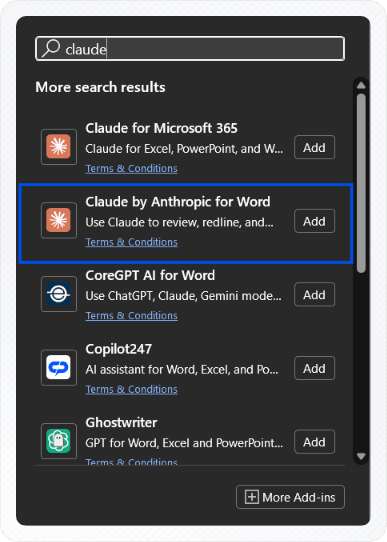
For a whole organization, an admin can deploy the add-in from the Microsoft 365 Admin Center (Settings → Integrated apps → Add-ins, with Office Store access allowed for users), assigning it to everyone or to specific users and groups. Once deployed, people activate it from Home → Add-ins on Windows or Tools → Add-ins on Mac and sign in. Claude's documentation also covers deployment with a custom manifest when the Office Store is turned off.
Claude for Word vs exporting a Claude chat to Word
The quickest way to choose is by where your content lives right now.
| Claude for Word add-in | Exporting a Claude chat to Word | |
|---|---|---|
| Starting point | A document already open in Word | A conversation on claude.ai |
| What you get | Edits, answers and drafted sections inside that document | A new .docx containing the conversation or one answer |
| Typical use | Reviewing contracts, revising reports, filling templates | Keeping research, study notes or an answer you want to reuse |
| Tracked changes | Yes, built in | Use Word's own tracking after export |
| Claude plan | Pro, Max, Team or Enterprise | Any Claude plan (Team/Enterprise if your organization allows extensions); the extension has its own free and paid plans |
| Tool | Anthropic's add-in from Microsoft AppSource | The Claude to PDF extension, or copy-paste |
Choose the add-in when the work belongs in an existing Word document and you want Claude to edit it in place. Choose an export when the valuable part is already in a claude.ai conversation — an explanation, a plan, a table, a derivation — and you want it in Word to keep, edit or hand over.
How to get a claude.ai conversation into Word
If what you need is the conversation itself:
- Install the extension in a Chromium browser on your computer.
- Open the chat on claude.ai.
- Click Word at the top right for the whole chat, or at the bottom of one response for just that answer.
The .docx keeps headings, lists, code blocks and real Word tables, and writes math as editable Word equations — details in exporting a Claude chat to Word. Copying by hand works for short answers; the two parts that usually break have their own guides: pasting tables into Word and getting equations into Word.
What about asking Claude to create a Word file?
There's a third option people mix up with the other two: asking Claude on claude.ai to generate a brand-new .docx. With file creation turned on, Claude writes the document from your prompt and you download it from the chat. That's useful for drafting a new letter or template, but it isn't an export — Claude rewrites the content rather than copying your conversation. See can Claude create a PDF or Word file for how that works and when to use it.
Frequently asked questions
Is Claude for Word free?
Can Claude for Word export my claude.ai chats?
Is this site affiliated with Claude for Word?
How do I use Claude in Microsoft Office?
Related
- Claude to ExcelPaste, CSV, an .xlsx from Claude, or the add-in.
- Claude chat to WordNative Word equations and real Word tables.
- Copy a Claude table to WordWhy pasted tables break, and three fixes.
- Copy Claude equations to WordWord's LaTeX input, step by step.
- Can Claude create a PDF?Generating a document vs saving your chat.
- Claude to PDF extensionPrivate chats, artifacts and charts, no share link.